
Mastering Your Breakout Session AV Setup: The 2026 Planner’s Guide
Your keynote speaker might draw the crowd, but the real ROI of your conference happens in the smaller rooms where the actual work gets done. If you've ever managed ten concurrent sessions at once, you know the anxiety of wondering if the audio in Room 302 is peaking or if the breakout session AV setup in Room 405 just failed. It's frustrating when inconsistent quality or hidden hotel fees derail a perfectly planned schedule. You deserve a technical environment that supports your speakers instead of distracting them.
This guide will show you how to master your technical configurations to ensure professional-grade results across every square foot of your venue. We'll break down the essential gear checklist, share strategies for managing technical staff at scale, and reveal how to eliminate the logistical friction that often plagues multi-room events. By the end of this article, you'll have the confidence to deliver a seamless experience for every attendee, regardless of which door they walk through. We've simplified the complex details so you can focus on the big picture.
Table of Contents
Why Breakout Session AV Setup is the Secret to Conference Success
The Essential Components of a Professional Breakout Room AV Kit
Scaling Technical Production Across Multiple Concurrent Sessions
Avoiding Common Technical Friction Points in Small Meeting Rooms
Partnering with a Single-Source AV Provider for Seamless Execution
Why Breakout Session AV Setup is the Secret to Conference Success
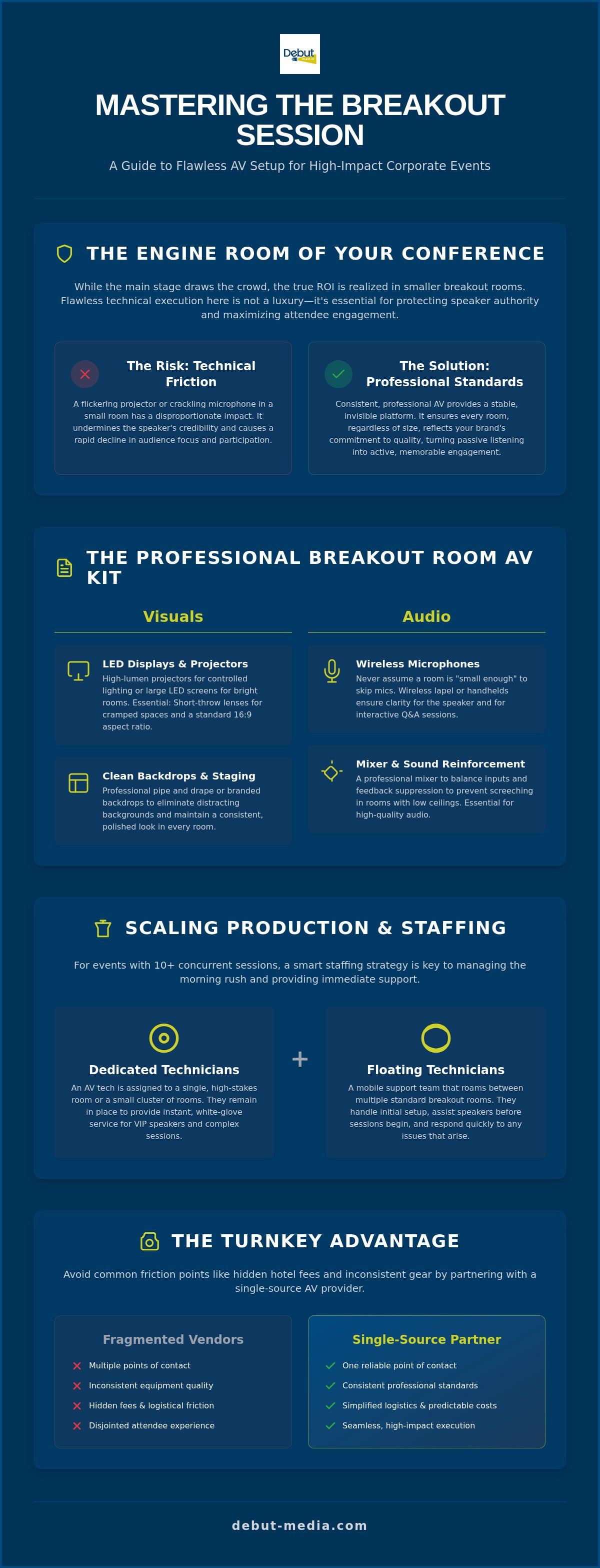
While the main stage often commands the largest portion of the production budget, the true value of a conference is frequently realized in its smaller spaces. Think of the breakout session as the engine room of corporate education and professional networking. It's here that high-level concepts from the keynote are dissected, debated, and turned into actionable strategies. When your breakout session AV setup is flawless, it provides a stable platform for these critical interactions to occur without interruption.
Technical friction in a small room has a disproportionate impact on the attendee experience. If a speaker has to struggle with a flickering projector or a crackling microphone, their professional authority is immediately undermined. Attendees begin to focus on the technical failure rather than the message, leading to a rapid decline in engagement. Maintaining technical consistency across your entire event footprint ensures that the quality of information is never overshadowed by the quality of the delivery system. It removes the invisible barriers that prevent people from connecting with the content.
The Shift from Passive Listening to Active Participation
Modern corporate events have moved away from one-way lectures toward collaborative workshops. This shift means that a standard screen and projector are no longer sufficient. High-quality audio is now the priority, as it facilitates interactive Q&A sessions and real-time polling where every voice needs to be heard clearly. In this context, your breakout AV acts as the bridge between content delivery and audience retention, turning a simple presentation into a memorable learning experience. You aren't just renting gear; you're building an environment for growth.
Avoiding the "Second-Class Citizen" Room Experience
It's a common mistake to treat smaller rooms as an afterthought compared to the grand ballroom. However, allowing brand standards to slip in these spaces creates a disjointed experience for your guests. Even in rooms with limited square footage, the inclusion of professional lighting and clean backdrops signals that the content being shared is valuable. Ensuring that every room maintains the same level of polish is a core part of comprehensive event production. By prioritizing the breakout session AV setup, you eliminate the feeling of "second-class" rooms and provide a cohesive environment that respects both the speaker and the audience. This attention to detail is what separates a standard meeting from a high-impact corporate event.
The Essential Components of a Professional Breakout Room AV Kit
Building a reliable breakout session AV setup requires more than just placing a speaker on a stand and plugging in a laptop. Each component must be selected to handle the specific physical constraints of smaller meeting rooms while maintaining high production standards. A professional kit is a balanced ecosystem where visuals, audio, and connectivity work together to eliminate technical hurdles. When these elements are properly integrated, the technology becomes invisible, allowing the content to take center stage.
Visual Displays: Projectors vs. LED Screens
Choosing the right display depends on the room's ambient light and physical dimensions. High-lumen projectors are excellent for creating large, impactful images in rooms where you can control the lighting. However, in many modern hotel meeting spaces with large windows, a large-format LED display often provides better contrast and clarity. You must consider "throw distance," which is the space required between the projector and the screen. In cramped breakout rooms, short-throw lenses are essential to prevent the speaker from casting shadows on their own slides. All presentation materials should be designed for a standard 16:9 aspect ratio to ensure they fill the modern screens and projectors utilized in 2026 event environments.
Audio Reinforcement for Intimate Settings
It's a dangerous myth to assume a room is "small enough" to skip microphones. Even in intimate settings, sound reinforcement ensures that every attendee hears the same clear, consistent message without the speaker straining their voice. Wireless lapel or handheld microphones are the standard for mobility. In rooms with low ceilings, feedback suppression is a critical requirement to prevent that sharp, piercing screech when a microphone gets too close to a speaker. A professional-grade mixer is necessary to balance these inputs, especially if you need to blend local sound with audio from a video or a remote presenter. If you feel overwhelmed by these technical requirements, partnering with audio visual services can provide the equipment and expertise needed for a stable environment.
Hybrid Integration and Virtual Connectivity
Modern breakout sessions often need to reach an audience beyond the four walls of the room. High-quality hybrid integration requires more than just a built-in laptop webcam. You'll need PTZ (pan-tilt-zoom) cameras that can follow the speaker and USB audio interfaces that bridge the gap between professional microphones and soft-codec platforms like Zoom or Teams. Stable, low-latency connectivity is the backbone of this setup. Using signal boosters and dedicated hardwired internet lines ensures that remote Q&A sessions happen in real-time without the distracting lag that kills audience engagement. By prioritizing these components, you create a seamless experience for both in-person and virtual attendees.
Scaling Technical Production Across Multiple Concurrent Sessions
Managing a single meeting room is straightforward. Managing twelve simultaneously is a logistical marathon. The "Morning Rush", that critical 15-minute window before the first sessions begin, is where most technical failures occur. A synchronized startup protocol ensures every breakout session AV setup is tested, calibrated, and live before the first attendee crosses the threshold. This level of coordination requires a move away from fragmented management toward a centralized, methodical approach.
Standardization is your greatest ally when scaling production. If a speaker knows how to operate the remote and HDMI switcher in Room A, they should feel equally confident in Room J. By standardizing the user interface across all rooms, you reduce the "learning curve" for presenters and decrease the number of support calls. Centralized signal management further enhances this cohesion, allowing you to push live content to overflow rooms or update digital signage across the entire venue from a single control point.
The Logistical Blueprint for Multi-Room Success
A master technical schedule is the backbone of any large-scale event. This document tracks every transition, speaker change, and equipment requirement across all rooms in real time. To maintain sanity, you need a single point of contact to oversee this complexity. Instead of chasing dozens of individual technicians, you work with one master coordinator who manages the entire team. This is where professional audio visual services act as a stabilizing force. They provide the expert oversight needed to maintain high standards and ensure that no room is left behind during the transition periods.
Staffing doesn't always require a dedicated technician for every door. A "floating" technician strategy, where one expert oversees three or four adjacent rooms, offers a balance of cost efficiency and rapid response. These specialists are equipped to handle minor adjustments, while a central lead technician handles high-level troubleshooting.
Managing Equipment Strike and Rapid Turnarounds
Efficiency is just as important at the end of the day as it is at the start. Professional equipment strike services ensure all gear is removed quickly and safely, which helps you avoid expensive venue overtime costs. During the live event, a "hot-swap" strategy is essential for peace of mind. If a cable fails or a projector reaches its limit, a replacement should be waiting in the hallway, ready to be deployed in seconds. Finally, security is a priority. All rental laptops must undergo a documented data wipe between sessions to protect speaker intellectual property and sensitive corporate data. This methodical approach ensures that your breakout session AV setup remains secure, reliable, and professional from start to finish.
Avoiding Common Technical Friction Points in Small Meeting Rooms
Many planners focus their energy on the ballroom but neglect the technical vulnerabilities of smaller breakout spaces. A successful breakout session AV setup relies on anticipating failures before they occur. These "friction points" often result from a lack of foresight regarding the room's physical limitations or the speaker's specific technical needs. By following a methodical preparation process, you can eliminate these hurdles and ensure a smooth experience for every presenter.
Step 1: Conduct a Comprehensive Power Audit. Hotel meeting rooms often share electrical circuits with adjacent spaces or hallway outlets. Plugging in a high-wattage coffee urn next to your AV rack can trip a breaker mid-session. Always identify dedicated circuits for your gear to avoid sudden blackouts.
Step 2: Implement a Speaker Ready Room Protocol. Avoid the "thumb drive hand-off" at the podium. Establish a dedicated space where every speaker must test their files at least two hours before their session. This catches font incompatibilities and broken video links before they reach the stage.
Step 3: Secure All Cabling. Safety is a core component of professional production. Use professional-grade gaff tape to secure every cable run. This prevents trip hazards for attendees and keeps the room's aesthetic clean and organized.
Step 4: Conduct Wireless Frequency Coordination. When you have ten rooms side-by-side, wireless microphones will interfere with each other if they aren't properly managed. A technician should map the local RF environment to assign clean, non-overlapping channels to every room in your breakout session AV setup.
The Hidden Danger of In-House Hotel AV
Venue-exclusive providers often charge a high "service fee" that doesn't always translate into superior support. In many cases, these providers use aging inventory that is subject to heavy wear and tear. Working with a dedicated production partner ensures you have access to well-maintained equipment and a team that is fully invested in your event's success. If your contract includes an exclusive vendor clause, you can often negotiate the right to bring in an outside team by paying a "patch fee" to the venue. This small investment often pays for itself through increased reliability and expert oversight.
Audio Feedback and Room Acoustics
Small rooms frequently suffer from sound bleed through thin air-walls. To manage this, place speakers strategically to direct sound toward the audience and away from the partitions. Proper placement also eliminates "hot spots" where the volume is uncomfortable for front-row guests. For the best results, utilize digital signal processors (DSP) for auto-mixing in small spaces to maintain consistent audio levels without manual intervention. If you want to ensure your next event is free from technical distractions, contact us for professional audio visual services that prioritize your peace of mind.
Partnering with a Single-Source AV Provider for Seamless Execution
Managing a national conference with dozens of rooms often feels like managing a series of localized technical fires. When you work with fragmented vendors or rely solely on disparate in-house teams, you increase the risk of communication breakdowns. Debut Media acts as a stabilizing force in these high-pressure environments by providing a single, authoritative point of contact for your entire event. This turnkey approach ensures that your breakout session AV setup remains consistent across every room, regardless of the venue's size or location.
The administrative relief of a single-source partnership cannot be overstated. Instead of chasing multiple invoices and coordinating with different technical leads, you benefit from a streamlined process that covers everything from initial site visits to the final equipment strike. We specialize in customizing AV packages that scale to your specific needs, whether you are hosting intimate corporate seminars, sprawling trade show expos, or high-stakes gala dinners. By consolidating your technical management, you eliminate the logistical friction that often distracts from the event's primary objectives.
Reassuring Excellence: The Debut Media Approach
Our commitment to a solution-oriented framework means we don't just provide gear; we provide peace of mind. We understand that you have enough to manage without worrying about signal latency or microphone interference. Our team handles the complex "moving parts" of the production so you can focus entirely on your attendees and speakers. This level of expert oversight is what transforms a standard meeting into a professional production. For those planning a full event schedule, you can further refine your strategy by reviewing our Ultimate Corporate Awards Ceremony AV Checklist for 2026, which offers additional insights into managing high-profile stage environments.
Next Steps: Planning Your 2026 Breakout Strategy
Success in the 2026 event season requires early coordination and a clear technical blueprint. As equipment rental rates and labor costs continue to fluctuate, securing your technical crew and hardware well in advance is essential for accurate budgeting. We recommend beginning the planning process at least four to six months out for multi-room national events. This allows for a comprehensive breakout session AV setup audit and ensures that specific hybrid integration needs are met without last-minute surcharges.
Ready to eliminate the technical hurdles from your next conference? Our team is prepared to walk you through a logical progression of ideas to build a stable, scalable production plan. Contact Debut Media for a professional AV consultation and discover how a singular, organized entity can replace the need for fragmented communication and logistical stress.
Secure Your Event Success with Professional Coordination
Mastering your breakout session AV setup is about more than just hardware; it's about creating a stable environment where communication flows without interruption. By prioritizing high-quality audio and visual standards across every room, you protect your speakers' authority and keep your audience engaged. Scaling these results across multiple concurrent sessions is only possible with a methodical approach to management and a commitment to technical consistency. You don't have to navigate these technical complexities alone.
Debut Media acts as your stabilizing force, providing a single point of contact for national event production. We handle the expert technical operation for seminars and galas, along with comprehensive equipment rental and strike services. We take the logistical weight off your shoulders so you can focus on the big picture. Simplify your next conference with Debut Media’s turnkey AV services and ensure every detail is handled with precision. Your next event deserves a technical foundation that is as ambitious as your content.
Frequently Asked Questions
What is the standard AV equipment needed for a 50-person breakout room?
A professional 50-person room requires a 75-inch LED display or a 4,000-lumen projector, a pair of powered speakers, and at least one wireless microphone. You'll also need a small analog or digital mixer and a dedicated presentation laptop. This configuration ensures that every attendee has a clear line of sight and can hear the speaker without distortion, even in the back row.
How many technicians do I need for multiple concurrent breakout sessions?
You should plan for one dedicated technician to oversee every three to four rooms, supported by a lead "floater" who manages high-level troubleshooting. This ratio provides enough coverage to handle the high-pressure transitions between sessions while keeping labor costs efficient. A single point of contact manages this team to ensure every breakout session AV setup remains operational throughout the day.
Can I bring in my own AV company if the hotel has an in-house provider?
Yes, you can almost always bring in an outside AV partner by negotiating the right to do so before you sign your venue contract. While hotels may charge "patch fees" or "rigging fees" to outside vendors, the reliability and specialized support of a dedicated production team often outweigh these costs. It replaces fragmented communication with a singular, organized entity that understands your specific brand standards.
How do I ensure my hybrid breakout sessions are engaging for remote viewers?
Engagement for remote viewers depends on high-quality PTZ cameras and a dedicated USB audio interface that captures professional-grade sound for the stream. You must also prioritize the audio for audience questions. Using a second microphone specifically for attendee Q&A ensures that remote participants feel included in the conversation rather than just watching it from a distance.
What is the difference between a breakout session and a keynote AV setup?
Keynote setups focus on high-impact visual spectacle and large-scale reinforcement for the entire audience, while a breakout session AV setup prioritizes intimate clarity and interactive tools. Keynotes often involve massive LED walls and complex lighting rigs. Breakouts are more functional, focusing on tools like HDMI switchers and wireless frequency coordination to prevent interference between adjacent rooms.
How much space should I allocate for the tech table in a small room?
Allocate a minimum of 6x6 feet for the technician's station, ideally located at the back of the room or in a side corner with a clear view of the stage. This space must accommodate the mixer, laptop, signal switchers, and the technician themselves. Keeping the tech table organized and out of the primary traffic flow prevents accidental cable disconnections and maintains a professional room aesthetic.
What happens if a speaker brings a laptop with an incompatible port?
Your technical team should carry a comprehensive "adapter kit" that includes USB-C to HDMI, DisplayPort, and Mini-DisplayPort converters to handle any hardware. This common point of friction is best solved during a "Speaker Ready Room" protocol. Testing every device at least two hours before the session begins ensures that hardware mismatches don't cause embarrassing delays at the podium.
How do I manage audio feedback in a small room with multiple microphones?
Manage feedback by using digital signal processors (DSP) for automatic mixing and ensuring that speakers are placed well in front of the microphone's pickup pattern. In rooms with low ceilings, microphones can easily catch reflected sound, which leads to that piercing screech. Proper gain staging and the use of directional microphones help isolate the speaker's voice and maintain a stable audio environment.


