
Seminar AV Checklist: 2026 Guide to Flawless Events
With the global professional AV market projected to reach $310.38 billion in 2026, the sheer scale of available technology has made event planning more complex than ever. You shouldn't have to be a technical engineer to host a successful corporate gathering, yet many planners find themselves buried under confusing jargon and fragmented vendor quotes. It's natural to worry about a microphone cutting out or a presentation failing to load during a high-stakes moment. You deserve the confidence that comes from knowing every technical detail is under control before the first attendee arrives. This comprehensive seminar AV equipment checklist is designed to act as your steady hand, providing the clarity you need to manage moving parts with ease.
We've vetted this guide to eliminate logistical friction and replace technical anxiety with professional reliability. You'll learn exactly which hardware is essential for modern venues, how to handle the shift toward direct view LED displays, and why integrated coordination is the secret to a glitch-free day. This walkthrough transforms a mountain of equipment into a manageable, step-by-step plan for success. By the end of this guide, you'll have a clear roadmap to ensure your speakers are heard, your visuals are crisp, and your brand's reputation remains flawless.
Table of Contents
Beyond the Hardware: Why Your Seminar AV Needs a Strategic Checklist
Audiovisual technology is the stabilizing force of modern corporate communication. It's the medium through which your brand's message reaches the audience, making it far more than a collection of speakers and screens. When technical friction occurs, the audience loses focus and your message loses its impact. A comprehensive seminar AV equipment checklist ensures that logistical hurdles are cleared long before the first speaker takes the stage. It provides a structured roadmap that eliminates the "day-of" anxiety common among event planners.
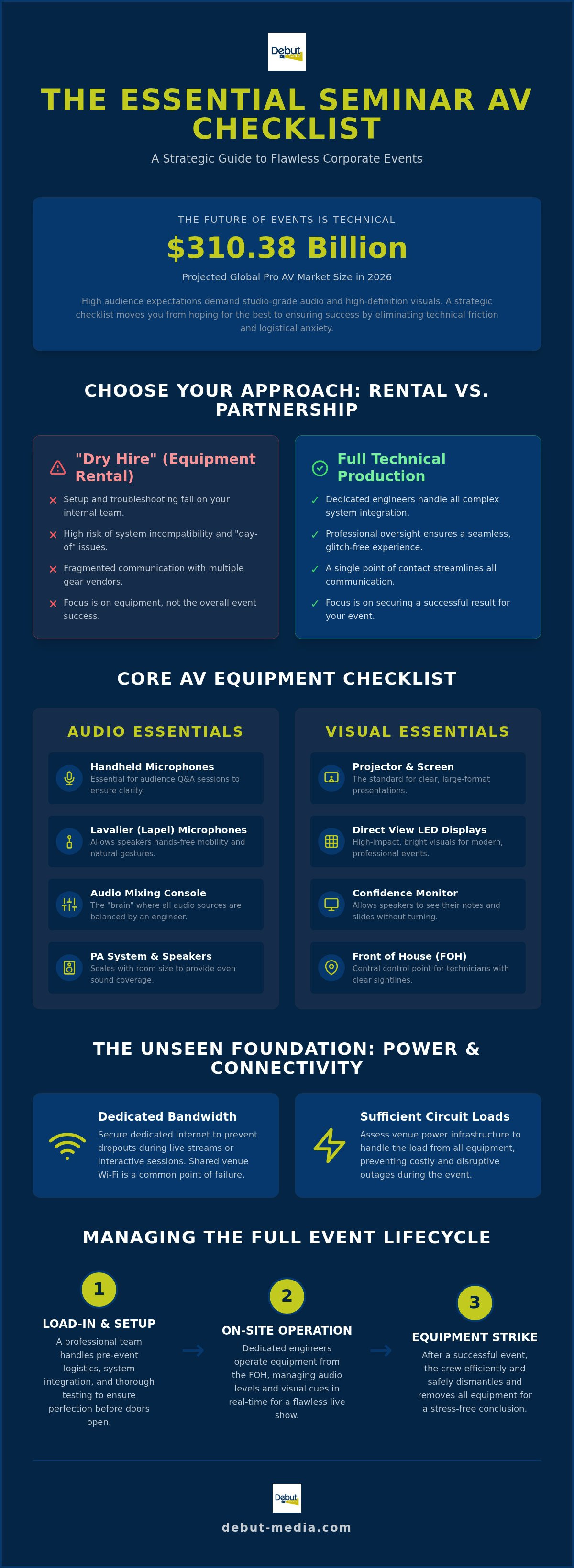
In 2026, audience expectations have reached an all-time high. Even small seminars are now expected to deliver high-definition visuals and studio-grade audio. This shift has widened the gap between a "dry hire," which involves simply renting equipment, and a full technical production service. While a dry hire leaves the setup and troubleshooting to your internal team, a production partner handles the complex integration of systems. To understand the foundational components involved in these setups, it's helpful to review What is Audiovisual (AV)? and how these elements interact to create a cohesive environment. By moving away from a purely transactional gear rental, you secure a seamless experience where the technology supports, rather than distracts from, the presentation.
Defining Your Seminar Technical Requirements
Successful events begin with an honest assessment of the venue and audience scale. Technical needs scale sharply with room size. For example, while a basic PA system might suffice for 50 attendees, a seminar for 150 to 400 people requires a mid-scale audio system to ensure clear coverage in every corner. You must also identify the "front of house" location. This is the central control point where technicians manage the mixing console and visual cues. FOH placement matters. If the technician can't see the stage or hear what the audience hears, they can't react to live changes. Finally, assess the venue's infrastructure, such as available circuit loads and ceiling heights, to prevent power failures or obstructed views.
The Emotional Relief of Professional Oversight
The most significant benefit of an expert partner is the emotional relief of efficiency. Moving from a transactional mindset to a partnership approach changes the dynamic from "renting gear" to "securing a result." For internal marketing teams, this eliminates the burden of managing multiple technical vendors. You won't have to chase different contacts for microphones, projectors, or cables. Utilizing a single vendor for event production streamlines communication and ensures every item on your seminar AV equipment checklist is executed with precision. This professional oversight allows you to focus on your attendees while a seasoned specialist manages the moving parts in the background.
Core Audio and Visual Essentials for Professional Seminars
High-quality hardware serves as the backbone of any corporate event. A successful seminar AV equipment checklist begins with the dual pillars of sound and vision. For the speaker, a lavalier microphone is often the preferred choice because it allows for hands-free mobility and natural gestures. Handheld microphones remain essential for audience Q&A sessions, ensuring every question is heard by the entire room. When organizing these components, referring to a verified list of Core AV Essentials helps ensure no piece of hardware is overlooked during the planning phase.
The mixing console acts as the brain of your audio setup. It's the point where multiple microphone feeds, video audio, and background music converge. Having a dedicated audio engineer to operate this console is crucial. They balance levels in real-time, preventing the jarring volume spikes or muffled tones that can distract an audience. If the technical complexity feels high, partnering with a specialist for Audio Visual Services provides the peace of mind that every connection is secure and every level is optimized.
Audio Clarity: Ensuring Every Word Reaches the Back Row
Sound systems must be scaled to a room's specific acoustics. A large ballroom with high ceilings requires a different speaker placement strategy than a carpeted boardroom to avoid echoes. Feedback suppression tools are necessary to stop that high-pitched squeal before it starts. For seminars with hybrid components, audio interfaces are vital. These devices ensure that remote speakers are heard clearly through the house speakers while preventing their own voices from looping back to them. This level of integration removes the logistical friction that often plagues mixed-attendance events.
Visual Impact: Projectors, Screens, and Displays
Visibility is non-negotiable for professional presentations. In 2026, the 16:9 aspect ratio is the absolute standard for corporate slide decks. Using a high-lumen projector for rent ensures that your visuals remain crisp even in rooms with significant ambient light. Planners must choose between front projection, where the projector is in the audience, and rear projection, which hides the equipment behind the screen for a cleaner look. While projectors work best for large main stages, LED monitors are often more effective for breakout sessions or smaller workshops where space is limited.
To round out your seminar AV equipment checklist, don't forget the tools that support the presenter. Confidence monitors placed at the foot of the stage allow speakers to see their slides without turning their backs to the audience. Digital clickers with long-range connectivity and high-spec laptops dedicated solely to the presentation prevent the lag and crashes that can derail a professional atmosphere.
The Technical Layer: Connectivity, Power, and Backups
Stable infrastructure is the silent partner of every successful event. Even the most advanced microphones and projectors discussed earlier will fail if the underlying technical layer isn't secure. Connectivity in 2026 goes beyond simple Wi-Fi; it requires dedicated bandwidth specifically for presenters to prevent attendee mobile traffic from slowing down live demonstrations. Your seminar AV equipment checklist must also prioritize high-speed HDMI and SDI cabling. While HDMI is standard for short distances, SDI is the professional choice for long cable runs, as it features locking connectors that won't accidentally pull loose during a presentation.
Signal distribution is another critical element for a professional atmosphere. Using a seamless video switcher allows your technical team to transition between multiple laptops and video sources without the audience seeing a "No Signal" screen or a messy desktop background. This setup is supported by a "Save the Day" kit, a physical collection of accessories that every planner should have on hand. This kit includes USB-C to HDMI adapters, various display dongles, and backup digital clickers. These small items often represent the difference between a minor delay and a complete technical halt.
Power management requires more than just finding an outlet. You need to identify circuit loads to ensure your high-lumen projectors and sound systems don't trip a breaker. Professional "stinger" extension cords, which are heavy-duty and designed for high-traffic environments, should be placed strategically to keep the stage area clean and safe. This methodical approach to power and signal ensures that the hardware performs exactly as intended.
Cabling and Signal Integrity
Cable management is a matter of both aesthetics and safety. Trip hazards are a significant liability, so every run of cable must be secured using professional gaff tape or heavy-duty cable ramps in high-traffic zones. To maintain consistent audio quality across a large venue, digital signal processing (DSP) units are used to clean and level the sound before it reaches the speakers. In environments with high electronic interference, such as trade show floors, using shielded cables is a non-negotiable requirement to prevent hums and visual flickering.
Redundancy and Emergency Planning
The "fixer" mindset assumes that something will go wrong and prepares accordingly. This means having primary and backup laptops for every critical keynote, with both machines running the presentation in sync. For mission-critical gear like mixing consoles and show computers, Uninterruptible Power Supplies (UPS) provide a vital battery buffer during temporary power surges or outages. This layer of redundancy provides the emotional relief of knowing that your event is protected against the unexpected, allowing you to focus on your brand's message with total confidence.
Managing the Lifecycle: Setup, On-Site Operation, and Equipment Strike
A successful event isn't just about having the right gear; it's about the human layer of production. Planners often focus on the hardware but neglect the complex timeline of the day. Coordinating with venue logistics and loading docks is the first hurdle. If your team can't get the equipment into the room on time, the rest of your seminar AV equipment checklist won't matter. Technical labor typically represents 30-50% of the total AV rental cost for professionally supported events. This investment ensures that your checklist is executed by experts who understand the nuances of venue schedules and freight elevator restrictions.
Professional Technical Operation
Once the gear is in place, the on-site technician becomes the stabilizing force of your event. They act as the "fixers" who manage the live flow of the seminar. A key part of this is the cue-to-cue rehearsal. Your AV team should walk through the script with every speaker to ensure they understand how to use the mics and clickers. This preparation allows for seamless switching between slides, videos, and live microphones. Technicians also provide real-time troubleshooting. They catch and fix signal flickers or audio feedback before the audience even notices a problem, maintaining a professional atmosphere throughout the day.
The Importance of a Managed Strike
The event doesn't end when the last attendee leaves. In fact, the "strike" or teardown is a critical phase of corporate event logistics management. Professional strike services ensure that all rented equipment is efficiently inventoried, packed, and removed from the premises. This prevents logistical friction with the venue's next booking and ensures the space is returned in pristine condition. Skipping a managed strike often leads to damaged gear or expensive venue penalty fees. A clean logistical exit is just as important as a smooth setup for your brand's reputation.
Finally, every event should conclude with a post-event evaluation. We review technical successes and any hurdles faced during operation to refine your strategy for future gatherings. This methodical approach ensures that your seminar AV equipment checklist evolves and improves for every subsequent event. If you want to eliminate the stress of technical coordination, our comprehensive Event Management services provide a single point of contact for the entire production lifecycle.
Simplifying Your Production: The Single-Vendor Advantage
Managing a high-stakes seminar often involves juggling five or six different technical vendors. You might have one company for the stage, another for the projector, and a third for the sound system. This fragmentation is where logistical friction begins. Choosing a single vendor for event production eliminates the confusion of multiple contracts and conflicting schedules. When one team handles everything, you gain a cohesive environment where the lighting, sound, and graphics are perfectly synchronized to reflect your brand identity.
Bundling these services also leads to significant cost efficiencies. Instead of paying for separate travel and labor overhead for three different crews, you benefit from a streamlined team that manages every moving part. This "one-stop" resource approach doesn't just save money; it provides the emotional relief of knowing exactly who to call if a question arises. You get the stability of a master coordinator who has seen every scenario and has a plan ready for each one. This partnership moves away from a transactional feel toward a reliable, expert-led oversight of your event.
Turnkey Solutions for Modern Seminars
Maximum efficiency is achieved when you combine hardware with full management. Turnkey solutions mean you aren't just getting a list of gear; you're getting a complete production plan. Our in-house technical production team ensures higher reliability than outsourced labor because they work together daily on complex integrations. Utilizing professional audio visual services allows you to step back from technical minutiae and focus on your attendees. You deserve a partner that acts as a steady hand, ensuring every detail from signal distribution to lighting cues is handled correctly.
Next Steps: Booking Your Seminar Production
Securing a top-tier technical team requires planning. We recommend booking your production partner 3 to 6 months in advance. This window allows for a thorough discovery process where we move from a simple quote to a detailed production plan. During this phase, you'll work with a specialist to finalize your seminar AV equipment checklist, ensuring that every adapter, backup laptop, and microphone is accounted for. This collaborative approach transforms a generic equipment list into a bespoke technical strategy designed for your specific goals. By finalizing these details early, you eliminate "day-of" anxiety and guarantee a professional atmosphere that reflects well on your brand.
Execute Your Next Event with Total Confidence
A flawless seminar depends on the seamless integration of high-definition hardware and expert logistical coordination. We've explored how a strategic seminar AV equipment checklist transforms technical complexity into a manageable, reliable process. By prioritizing signal redundancy, professional technical operation, and the efficiency of a managed equipment strike, you ensure your brand's message is delivered without a single glitch. You don't have to manage fragmented vendors or navigate technical jargon alone when a stabilized, turnkey solution is available.
Our expert technical crew brings a solution-oriented approach to every production, acting as a steady hand for your team. We provide turnkey solutions for national corporate events, offering a single point of contact to eliminate all logistical friction. Streamline your next seminar with Debut Media’s professional AV services and experience the peace of mind that comes from expert oversight. Your next presentation is an opportunity to shine; we're here to ensure the technology supports your success every step of the way.
Frequently Asked Questions
What is the most essential AV equipment for a small corporate seminar?
A high-lumen projector, appropriately sized screen, and a reliable sound system with at least one wireless microphone are the foundational pieces for a small seminar. These core items ensure visuals are visible and speakers are audible for every attendee. You should also include a digital clicker and a dedicated presentation laptop to maintain a professional flow. Having these basics on your seminar AV equipment checklist prevents common technical hurdles during the event.
Do I need a professional technician on-site, or can I run the AV myself?
Hiring a professional technician is highly recommended because it allows you to focus on your attendees while an expert manages the technical complexity. While running a basic setup yourself is possible, technicians provide real-time troubleshooting for signal drops or audio interference. They act as a stabilizing force, handling the "human" layer of production that hardware alone cannot solve. This oversight ensures your event remains glitch-free from start to finish.
What is the difference between front projection and rear projection for seminars?
Front projection places the equipment in the audience area, while rear projection hides the projector behind a translucent screen. Front projection is more common for smaller spaces with limited depth. Rear projection offers a cleaner look and prevents shadows when speakers walk in front of the screen. The choice depends on your stage layout and the available floor space behind the presentation area to accommodate the projector's throw distance.
How do I avoid audio feedback and technical glitches during my keynote?
You can avoid audio feedback by ensuring microphones are never placed directly in front of speakers and by using feedback suppression tools. Conducting a full cue-to-cue rehearsal with your technical team is also vital. This walkthrough identifies potential signal issues before the audience arrives. Using high-quality shielded cables and a dedicated audio engineer helps maintain consistent sound levels and eliminates the jarring noise that can distract your audience.
What is an "equipment strike" and why is it included in my AV quote?
An equipment strike is the professional teardown and removal of all AV gear from the venue after your event concludes. It's included in your quote because it requires specialized labor to inventory, pack, and transport hardware safely. This service ensures the venue is returned in pristine condition, helping you avoid damage fees and logistical friction with the venue's next booking. It's the final step in a seamless production lifecycle.
Can I use a standard Wi-Fi connection for my seminar’s live-streaming needs?
Standard venue Wi-Fi is rarely sufficient for live-streaming because it's often shared with hundreds of attendees. For a stable broadcast, you need a dedicated hardwired ethernet connection with guaranteed upload bandwidth. This prevents the lag or signal drops that occur when mobile traffic spikes. Securing a dedicated line is a critical item on any 2026 seminar AV equipment checklist for events that involve remote participants or hybrid components.
How do I choose the right microphone for a panel discussion versus a single speaker?
Single speakers benefit most from lavalier or headset microphones, which provide hands-free mobility and consistent audio levels. For panel discussions, a mix of tabletop microphones for participants and handheld wireless mics for audience Q&A is more effective. This setup allows the audio engineer to balance multiple voices simultaneously. Choosing the right microphone type ensures every contributor is heard clearly regardless of the stage format or the number of participants.
What are the benefits of using a single vendor for both AV and event management?
Using a single vendor for AV and event management eliminates fragmented communication and reduces logistical friction. You gain a single point of contact who understands both the technical requirements and the overall event goals. This integrated approach often leads to cost efficiencies by bundling labor and travel overhead. It provides the peace of mind that comes from having a master coordinator manage every moving part, ensuring a cohesive brand experience.


