


Mastering Speaker Ready Room Management: The 2026 Technical Checklist
- 14 hours ago
- 12 min read
Imagine a speaker walking into the backstage area minutes before their keynote, only to realize their high-definition video file won't sync with the house system. It is a moment of pure panic that can derail an entire event schedule. You know that the success of a session is often decided long before the first word is spoken. Effective speaker ready room management is the invisible engine that transforms this potential for technical chaos into executive confidence.
We understand that managing last-minute slide changes and anxious presenters is a high-pressure balancing act. You deserve a process that guarantees a seamless flow of content from the prep room to the main stage without the fear of file compatibility issues. This guide will show you how to eliminate technical friction and ensure flawless delivery every time. We'll provide a comprehensive 2026 technical checklist to help you stay ahead of the curve. From implementing Wi-Fi 7 connectivity to meeting HDMI 2.1 standards, we'll walk through the steps needed to ensure your speakers feel supported and your event remains professional.
Table of Contents
What is Speaker Ready Room Management in 2026?
In 2026, the speaker ready room is far more than a simple staging area. It is the centralized hub for every byte of digital event content. This space functions as the mission control for every pixel shown on screen; it is where complex files are scrubbed, verified, and prepared for broadcast. Professional speaker ready room management ensures that the transition from a speaker’s laptop to the main screen is invisible to the audience. This process replaces the anxiety of technical failure with the peace of mind that comes from expert oversight.
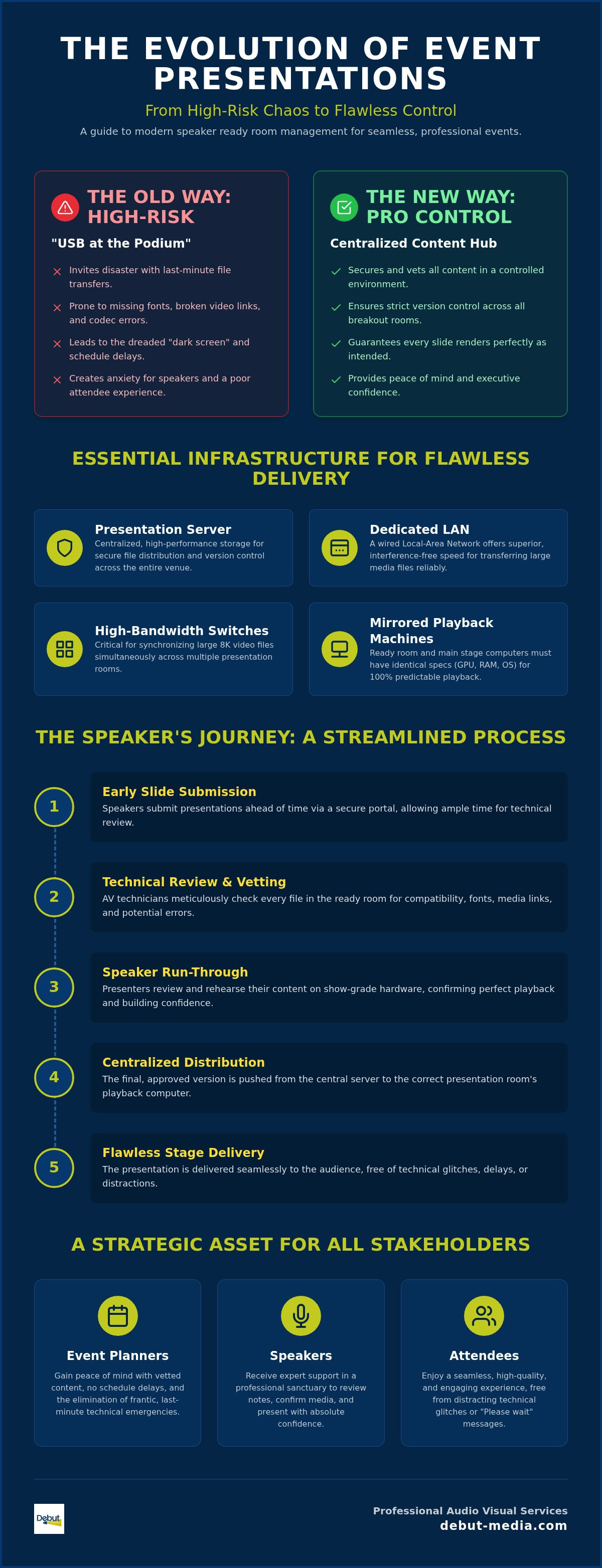
Relying on the traditional "USB at the podium" method is now considered a high-risk strategy. In a modern conference hall, the technical environment is far too complex for last-minute plug-and-play attempts. Handing a thumb drive to a technician seconds before a session begins invites disaster. Missing fonts, broken 8K video links, and codec incompatibilities often result in the dreaded "dark screen" moment. Centralized management eliminates these variables by vetting every file in a controlled environment long before the session starts.
The primary goal of this management style is absolute technical perfection. It isn't enough for a presentation to simply "work." Every slide must render exactly as the designer intended, and every interactive element must respond instantly. To achieve this, the specialized AV technician acts as both a content curator and a speaker advocate. They aren't just managing hardware; they are protecting the speaker's reputation and the event's integrity by catching errors that the presenter might have missed.
The Nerve Center of Corporate Presentations
The ready room acts as a vital buffer between the speaker’s preparation and the high-stakes environment of the ballroom. By utilizing a centralized management system, you gain strict version control across the entire venue. If a speaker updates their deck at 9:00 AM, the system ensures the correct version is pushed to the appropriate breakout room for a 2:00 PM session. This level of synchronization is a core component of professional on-site event technical operation. It removes the guesswork and replaces it with a repeatable, secure workflow that scales with your event.
Key Benefits for Event Stakeholders
Effective speaker ready room management provides tangible value to everyone involved in the production. For event planners, it offers the emotional relief of knowing all content is vetted and secured. You don't have to worry about frantic radio calls or schedule delays. Speakers benefit from a quiet, professional sanctuary where they can review their notes and confirm their media plays perfectly on show-grade hardware. Finally, attendees enjoy a seamless, high-quality experience. They stay engaged with the message because they aren't distracted by technical glitches or "Please wait" messages while a technician searches for a missing file.
Essential Infrastructure for Professional Presentation Management
Professional infrastructure is the silent partner in every successful keynote. It provides the physical and digital framework needed to move data securely and quickly across a venue. Without a robust technical foundation, even the most skilled technicians are limited by their tools. High-performance hardware eliminates the friction often associated with large file transfers and complex media playback. By investing in the right architecture, you ensure that the technical workflow remains invisible to the audience.
Hardware and Networking Requirements
Reliability begins with a dedicated, wired local-area network (LAN). While wireless technology has improved, wired connections remain superior for presentation file transfers because they offer consistent throughput without the interference found in crowded event spaces. High-bandwidth switches are necessary to synchronize large 8K video files across multiple rooms simultaneously. A presentation server is a high-performance, centralized storage unit designed to distribute media files across a secure network to various playback locations within an event venue. This server ensures that the version of the file reviewed in the ready room is the exact one played on stage.
To maintain technical consistency, every playback machine in the ready room must mirror the specifications of the main stage computers. This includes matching graphics cards, RAM, and operating system updates. If a file works on the test bench, you need the certainty that it will perform identically in the ballroom. Professional Audio Visual Services prioritize this mirroring to remove the "it worked on my laptop" variable from the equation. This alignment is a critical component of sophisticated speaker ready room management.
Software and File Compatibility Standards
Software management is just as critical as the hardware. Version control protocols are essential for tracking multiple iterations of a slide deck. Technicians should use a standardized naming convention to avoid confusion during the heat of the event. Pre-loading a comprehensive library of essential codecs and specialized fonts prevents rendering errors that can ruin the visual impact of a slide. These errors often occur when a file is moved from a personal laptop to a show computer that lacks specific design assets.
The system must also bridge the gap between Mac and PC environments. Ensuring that Keynote files translate perfectly to PowerPoint, or providing dedicated Mac playback for Apple users, prevents last-minute formatting headaches. Redundancy is the final layer of this infrastructure. Every server and playback machine should have a secondary backup system ready to take over instantly in case of hardware failure. This "fail-safe" approach ensures zero downtime and protects the integrity of your event schedule, allowing speaker ready room management to function as a true risk-mitigation engine.
The Operational Checklist: Managing the Speaker Journey
Operational excellence in the ready room is what separates a standard conference from a high-caliber production. While the infrastructure provides the foundation, the speaker journey is defined by the quality of the technical interaction. A structured workflow ensures that every presenter, regardless of their technical proficiency, feels supported and prepared. This methodical approach to speaker ready room management eliminates the last-minute panic that often plagues large-scale corporate events.
The process begins long before the first attendee arrives. Establishing a secure online portal for early slide submissions allows your technical team to begin vetting content days in advance. When speakers arrive on-site, the check-in process should be welcoming and efficient. A dedicated technician greets the speaker and performs a comprehensive run-through of their entire deck. This isn't just a quick scroll; it is a meticulous validation of every embedded media file, hyperlink, and animation trigger to ensure they behave exactly as intended.
Once the file is approved, the technician pushes the finalized version to the specific room server via the secure LAN discussed earlier. The final step in this journey is verification. A technical handshake occurs between the ready room and the ballroom, where the "Show" laptop operator confirms receipt of the correct file version. This closed-loop system ensures that the speaker never walks onto a stage wondering if their latest edits made it to the screen.
Step 1: The Initial Technical Intake
During the initial intake, technicians focus on the technical "fit" of the presentation. A primary task is checking aspect ratios to ensure the slides match the 16:9 stage screens. If a speaker brings a legacy 4:3 deck, the technician can adjust the formatting immediately to prevent awkward black bars on the projection. This is also the time to identify and fix "broken" video links. Often, PowerPoint files lose their connection to external media when moved between computers. Our team relinks these assets and caches them locally for instant playback. We also verify that presenter notes are clearly visible on the confidence monitor, allowing the speaker to maintain eye contact with the audience rather than turning back to look at the screen.
Step 2: Quality Control and Speaker Reassurance
Technical support is as much about psychology as it is about hardware. We provide the speaker with the exact remote or clicker they will use on stage, letting them get comfortable with the button layout and tactile feel. If we detect font substitution issues, we address them immediately by installing the required design assets or flattening the slides to preserve the layout. Professional audio visual services streamline this transition by acting as a stabilizing force. This level of expert oversight transforms the speaker ready room management process into a concierge-level experience that builds presenter confidence and ensures a frictionless delivery on the main stage.
Mitigating Risks: Common Speaker Ready Room Pitfalls
Risk mitigation is the core of professional speaker ready room management. Even with a perfect network and high-performance servers, human variables and unexpected software glitches can introduce friction. The goal is to predict these hurdles before they impact the event schedule. By identifying common pitfalls early, you transform the ready room from a simple file collection point into a robust risk-mitigation engine that protects both the speaker and the event organizer.
One of the most frequent challenges is the "Last Minute Change" syndrome. Speakers often find a typo or want to update a data point minutes before their session. While you want to be accommodating, these changes must be managed through a strict protocol to avoid compromising the network sync. A professional team provides a "technical concierge" feel; we allow for these updates while ensuring every change is re-vetted and re-verified across the local-area network. This prevents the wrong version of a deck from appearing on the main stage.
Technical precision also extends to audio and specialized software. Medical or technical presentations often require custom simulations or high-resolution imaging platforms that must be pre-installed and tested. Similarly, embedded media often suffers from inconsistent audio levels. Our technicians normalize the volume across all video files in a deck, preventing the jarring sound spikes that can distract an audience. If you want to ensure your next corporate gathering is protected from these common technical pitfalls, consider partnering with a team that specializes in comprehensive Audio Visual Services.
Handling Technical Emergencies
Emergency preparedness is what defines a seasoned technical crew. When a speaker arrives with a corrupted file or a device that refuses to interface with the system, the technician must remain a stabilizing force. We maintain "clean" backup laptops that are pre-configured to match the show specifications, allowing for an immediate swap-out if a presenter's hardware fails. The golden rule of presentation backups is that a file only truly exists once it has been successfully opened and played on the specific hardware assigned to the stage. This proactive stance ensures that a hardware failure never results in a "dark screen" moment.
Data Security and Privacy Protocols
In 2026, data security is a non-negotiable priority for corporate events. As of July 2026, twenty U.S. states have comprehensive data privacy laws in effect, including new regulations in Indiana, Kentucky, and Rhode Island that became active on January 1, 2026. These laws require strict procedures for handling sensitive speaker information and corporate data. We implement rigorous file-shredding procedures immediately following the event teardown to ensure no intellectual property remains on show machines. Additionally, we restrict room access to authorized staff and utilize hardware-level scanning to protect against malware from external USB drives during the intake process.
Why Professional Management is a Strategic Event Asset
Professional management of your speaker ready room is more than a technical line item; it's a high-value insurance policy for your brand. The return on investment is often measured by the absence of failure. When you prevent a "dark screen" moment during a keynote, you protect the significant financial investment made in the venue, the speakers, and the audience's time. This strategic approach transforms a potential point of failure into a seamless extension of your corporate identity.
Working with a single point of contact reduces the immense planning stress that event organizers face. Instead of managing fragmented communication between hardware vendors and software providers, you have one partner responsible for the entire content lifecycle. This cohesion ensures that the technical standards established in the prep room carry through to the final presentation. Transitioning to a comprehensive event production model allows you to focus on the big picture while we handle the intricate details of file synchronization and hardware compatibility.
There is also a profound psychological impact on the presenters. When a speaker walks into a professionally managed environment and receives immediate, expert support, their anxiety levels drop. They feel like a VIP, which directly translates to a more confident and engaging delivery on stage. This support is a critical component of speaker ready room management that software-only solutions simply cannot replicate. We prioritize the human element because a relaxed speaker is always a more effective communicator.
The Peace of Mind Factor
We position ourselves as the stabilizing force in a complex industry. Our team acts as the seasoned "fixer" who has seen every possible technical scenario and has a plan ready for each one. This expert oversight eliminates the logistical friction that typically overwhelms planners. You don't have to worry about whether a specific video codec will play or if a font will render correctly. We absorb those technical burdens, providing you with the emotional relief of knowing your event's content is in safe hands.
Next Steps: Integrating a Ready Room into Your Event
Successful integration requires early planning regarding the physical layout of your venue. Consider these logistical factors for your 2026 event:
Proximity: Locate the ready room centrally, ideally within a two-minute walk of the main ballrooms to facilitate quick technical handoffs.
Capacity: Ensure the room is large enough to accommodate at least five percent of your total speaker count at any given time.
Staffing Ratios: Aim for a technician-to-speaker ratio of 1:15 for standard corporate meetings. For complex sessions involving AI-powered storytelling or interactive data, a 1:10 ratio is more appropriate.
The most effective way to secure your event's technical success is to consult with a specialist early in the planning phase. We can help you design a custom management workflow that fits your specific agenda and speaker requirements, ensuring every presentation is delivered flawlessly.
Secure Your Event's Technical Future
Mastering speaker ready room management is the most effective way to eliminate technical friction before it reaches the spotlight. By moving away from fragmented workflows and adopting a centralized infrastructure, you ensure that every presentation renders perfectly and every video plays without delay. We've seen how expert oversight transforms the speaker journey from a source of anxiety into a professional, VIP experience that empowers your presenters to shine.
Reliability comes from having a seasoned partner who handles the complexities of networking, file versioning, and data security. Debut Media provides turnkey technical production and an experienced on-site technical crew to act as your stabilizing force. With a single point of contact for all your AV needs, you don't have to worry about the logistical details. Ensure your speakers are ready for the stage with Debut Media's professional management services. Your audience is waiting for a flawless experience, and we're here to help you deliver it with total confidence.
Frequently Asked Questions
What is the primary purpose of a speaker ready room?
The primary purpose is to serve as a centralized technical hub where all digital content is vetted and verified before it reaches the stage. It acts as a buffer that eliminates the risks associated with "USB at the podium" methods by ensuring every file is compatible with the house system. This dedicated space provides speakers with the quiet environment they need to review their notes while technicians confirm that every transition and video file performs perfectly.
How many technicians are needed for a 50-speaker conference?
For a conference with 50 speakers, we recommend a ratio of approximately one technician for every 15 presenters. This means a team of three to four specialists is ideal to manage the intake and quality control process efficiently. This staffing level ensures that every individual receives a personalized technical run-through without creating a bottleneck that could delay your event schedule.
Should speakers be allowed to bring their own laptops to the podium?
We strongly advise against using personal laptops at the podium to maintain maximum stability. Personal devices often have unexpected software updates, notification pop-ups, or power management settings that can interrupt a presentation. By using standardized show laptops that mirror the ready room environment, you ensure a consistent visual experience and eliminate the need for last-minute adapter troubleshooting.
What is the best way to handle last-minute slide updates?
All updates must be processed through the speaker ready room management team to maintain strict version control. When a speaker brings a revised deck, our technicians re-verify the file on the local-area network (LAN) and push the finalized version to the specific ballroom server. This closed-loop process prevents the wrong version of a presentation from appearing on the main screen during a live session.
Do I need a speaker ready room for a single-track keynote event?
Yes, even a single-track event benefits significantly from a dedicated preparation space. It provides your keynote speakers with a professional sanctuary to test high-bandwidth media or interactive elements on show-grade hardware. This extra layer of oversight ensures that your most high-profile sessions remain flawless and that your speakers feel fully supported before they step into the spotlight.
How do I ensure video files play correctly across different rooms?
Success depends on using a centralized server and standardized codecs across every playback machine in the venue. Our team pre-loads essential media drivers and caches files locally via a high-speed wired network to ensure that 4K or 8K content plays smoothly. This infrastructure prevents the buffering or stuttering issues that often occur when playing files directly from a thumb drive or over a weak wireless connection.
What happens to the presentation files after the event is over?
All sensitive data undergoes a secure file-shredding procedure immediately following the event teardown. This protocol is a critical part of speaker ready room management in 2026, as it ensures compliance with expanding state data privacy laws. We prioritize the protection of your intellectual property by making sure no confidential corporate information remains on any playback or storage devices.
Can a speaker ready room handle both Mac and PC presentations?
A professional setup is designed to handle both Mac and PC environments seamlessly to support Keynote and PowerPoint natively. We maintain a fleet of playback machines that accommodate different operating systems and software versions. This flexibility eliminates the formatting shifts and font substitution errors that can occur when a file is forced into an incompatible environment.


